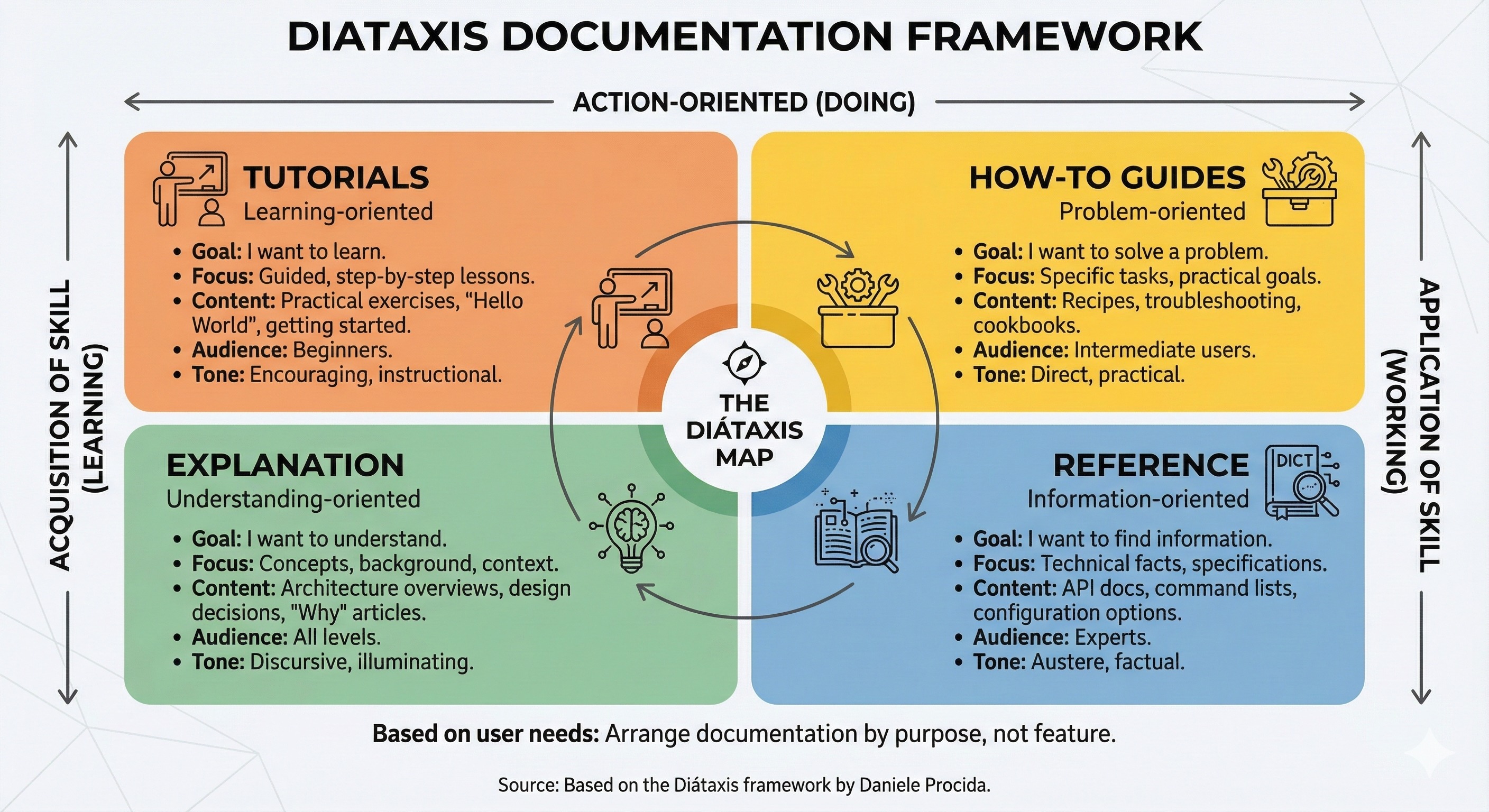
Diátaxis framework: Turn your docs wall of text into a system
Documentation often starts as a single file that quickly becomes an unnavigable "Wall of Text." This makes onboarding harder and forces users to hunt for information, killing productivity as they sift through layers of theory just to find a single command. By adopting the Diátaxis framework, we've transformed the Antigravity Hub's documentation from a monolithic burden into a modular, goal-oriented system that actually helps people get work done.
The Death of the MASTER-GUIDE
In the early days of the Antigravity Hub, we had a single MASTER-GUIDE.md. It was our pride and joy—until it hit 500 lines.
It was a mess of setup instructions, troubleshooting tips, architectural theory, and API references. If you wanted to know "How do I deploy?", you had to scroll past "Why we chose Cloudflare R2" and "How the webhook security signature works." It was a classic case of cognitive overload. We realized that by trying to tell everything to everyone at once, we were effectively telling nothing to no one. We needed a better way to organize our knowledge.
The Four Pillars of Diátaxis
We decided to migrate to the Diátaxis documentation framework, which organizes content based on the user's immediate need. Instead of a single folder, we created a goal-oriented file system with four distinct "buckets":
- Tutorials (
tutorials/): Learning-oriented. These are for the absolute beginner who needs a clear, successful path to their first "Hello World." No theory, just steps. - How-to Guides (
how-to/): Problem-oriented. These are for users who have a specific task—like "Styling & Theming" or "Debugging Deployment"—and need the recipe to solve it. - Reference (
reference/): Information-oriented. This is where the technical specs live. API payloads, file structures, and architecture diagrams. It's for the user who knows what they're doing but needs the data. - Explanation (
explanation/): Understanding-oriented. This is the place for theory. Why did we choose SSR? How does the "No-Touch" workflow actually work?
By separating these four distinct types of knowledge, we've eliminated the "information hunt." The folder structure itself tells you exactly where to look based on your current mindset.
Refactor Your Docs Today
If your project is currently suffering from "Monolithic README Syndrome," here is your path to recovery:
- Create a
docs/directory: Stop putting everything in the root or a single file. - Implement the Four Buckets: Create subfolders for
tutorials,how-to,reference, andexplanation. - Audit and Move: Take your existing documentation and ask: "Is this for someone learning, doing, looking up, or understanding?" Move it into the corresponding folder.
- Link from the Center: Use your main
README.mdas a map (a "Documentation Map") that points users to these specific buckets.
Documentation shouldn't be a chore to read or a nightmare to maintain. By organizing your knowledge with Diátaxis, you're not just writing docs—you're building a system that scales with your code.